Apache HTTPD
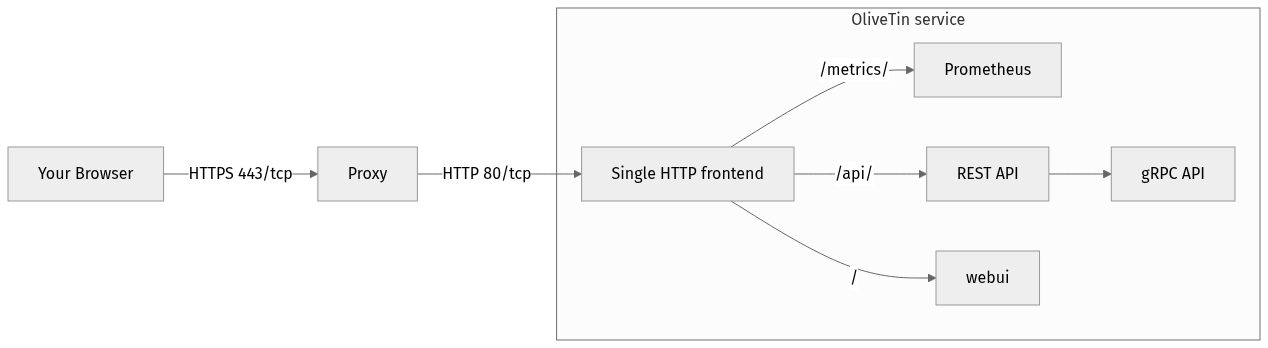
Figure 1. Flow of an inbound network request
This is an example of how to setup a DNS name based Apache HTTPD proxy for OliveTin. It assumes OliveTin is running on localhost, port 1337.
/etc/httpd/conf.d/OliveTin.conf
<VirtualHost *:80>
ServerName olivetin.example.com
ProxyPreserveHost On
ProxyPass / http://localhost:1337/
ProxyPassReverse / http://localhost:1337/

# Optional: increase timeout for long-lived websocket connections.
# The websocket endpoint is api/olivetin.api.v1.OliveTinApiService/EventStream (default may drop it).
ProxyTimeout 600
</VirtualHost>|
Apache’s default proxy timeouts are short for long-lived connections. Without increasing them, the websocket to |
Note, you virtual host should not include a DocumentRoot directive - httpd is just proxying OliveTin, not serving it’s actual pages.
If you proxy the websocket path explicitly, set a per-route timeout (place these before the general ProxyPass /):
ProxyPreserveHost On
ProxyPass /api/olivetin.api.v1.OliveTinApiService/EventStream ws://127.0.0.1:1337/api/olivetin.api.v1.OliveTinApiService/EventStream timeout=600
ProxyPassReverse /api/olivetin.api.v1.OliveTinApiService/EventStream ws://127.0.0.1:1337/api/olivetin.api.v1.OliveTinApiService/EventStream

# Optional global default for proxied backends
ProxyTimeout 600