Network ports
OliveTin might surprise some people when they see it is listening on several ports when it starts up. Most of these ports are internal and localhost-only by default. It keeps the architecture of OliveTin clean and simple, and allows for a lot of flexibility if needed.
Network flow diagram
Here is the default flow of traffic in OliveTin without any config changes.
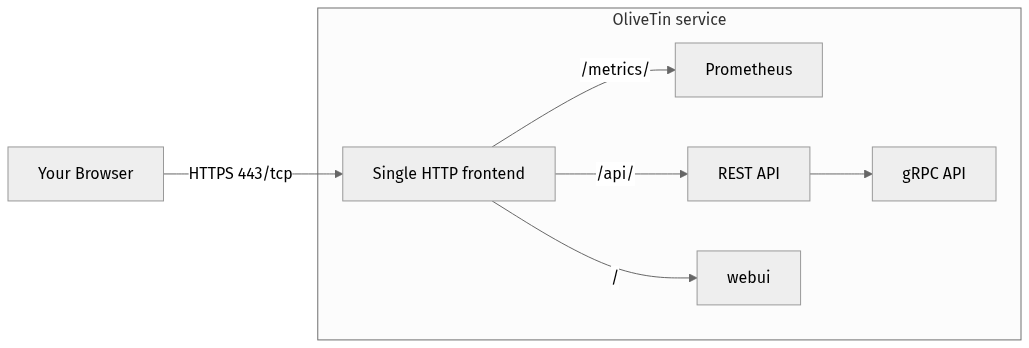
-
Traffic comes into OliveTin over your network and hits the only port listening - 1337, which listens on all interfaces. This is a micro HTTP reverse proxy.
-
Traffic for
/gets proxied tolocalhost:1340for the static web server. -
Traffic for
/api/gets proxied tolocalhost:1338for REST actions. -
The REST API actually makes gRPC API calls internally, to port
localhost:1339.
Below is a detailed reference table.
Port Reference Table
| Config file reference (and Default Address:Port) | Purpose |
|---|---|
|
This is a "micro reverse proxy" built into OliveTin. It’s only purpose is to serve /ui and / (the web interface) from a single endpoint. This means that problems like CORSs and setting "external addresses" is not necessary. It does not do any caching or anything else. It can be disabled, but it makes life a lot easier for you. It’s common to put your own reverse proxy like haproxy, traefik, etc in front of this single micro reverse proxy. |
|
REST - the protocol used by web pages to talk to web APIs. In the case of OliveTin, the API is used to get actions, and start actions. |
|
gRPC - a very popular method of service-to-service API communication. This provides the "real" API for OliveTin. |
|
Hosts a simple static web server with some HTML, stylesheets, Javascript etc for the web interface. |
|
Hosts a prometheus endpoint, which is disabled by default. See Prometheus to learn more. |
PORT environment variable
If the PORT environment variable is set at startup, OliveTin uses it as the listen port for listenAddressSingleHTTPFrontend only, keeping the host from the config (default host 0.0.0.0). This overrides an explicit port in config.yaml, which is useful on platforms that assign a port via PORT (for example Heroku or Cloud Run). Internal listen addresses (listenAddressRestActions, listenAddressWebUI, and so on) are not derived from PORT; configure those separately when needed.
When PORT is not set, OliveTin uses listenAddressSingleHTTPFrontend from the config, or 0.0.0.0:1337 if that setting is omitted.