Nginx
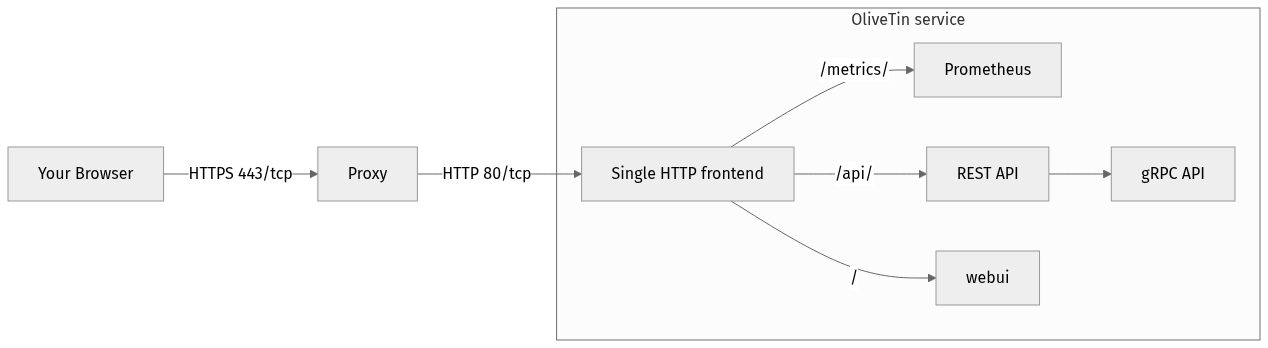
This is an example of DNS based proxying with Nginx.
server {
    listen 443 ssl;

    ssl_certificate "/etc/nginx/conf.d/server.crt";
    ssl_certificate_key "/etc/nginx/conf.d/server.key";

    access_log  /var/log/nginx/ot.access.log  main;
    error_log /var/log/nginx/ot.error.log notice;

    server_name olivetin.example.com;

    location / {
        proxy_pass http://localhost:1337/;
        proxy_redirect http://localhost:1337/ http://localhost/OliveTin/;
    }

    location /websocket {
        proxy_set_header Upgrade "websocket";
        proxy_set_header Connection "upgrade";
        proxy_pass http://localhost:1337/websocket;
        proxy_read_timeout 600s;
        proxy_send_timeout 600s;
    }
}
Increase the proxy timeout for the websocket location so the reverse proxy does not close long-lived connections; see Reverse proxies will close websockets if you see disconnects.
Custom paths
These "custom path" instructions are for when you want to use OliveTin with a custom path like "apps.example.com/olivetin" instead of the root path + DNS name - eg: "olivetin.example.com". Generally it is not recommended to use a custom path for OliveTin. Instructions are provided below though, and it mostly-works.
....
        location /OliveTin/ {
            proxy_pass http://localhost:1337/;
            proxy_redirect http://localhost:1337/ http://localhost/OliveTin/;
        }

        location /OliveTin/websocket {
            proxy_set_header Upgrade "websocket";
            proxy_set_header Connection "upgrade";
            proxy_pass http://localhost:1337/websocket;
            proxy_read_timeout 600s;
            proxy_send_timeout 600s;
        }
....
Note, because you are changing the default path (from / to /OliveTin/), you will need to tell the OliveTin webUI where to find the API.
You need to also set externalRestAddress in your config.yaml like this;
externalRestAddress: http://myserver/OliveTin